
 It is very important to choose a secure password to help protect your identity and information on the Internet. I previously wrote about strong password suggestions and how easy it is for bad guys and hackers to guess your weak password. In this article, I will walk you through a process on how you can create passwords that are not only secure but more importantly easy to remember. After all, you don’t want to forget your secure password. At the end of every step, I will show you how strong that password is.
Step 1: Choose a passphrase and create a pattern
The first step is to choose a sentence or a line that you know and is easy to remember. For example, I will use a generic sentence “Create a strong password for my bank account“. Now, select the first alphabet from your sentence. This would be
Caspfmba
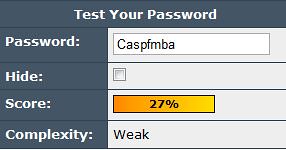
Step 2: Add Numbers
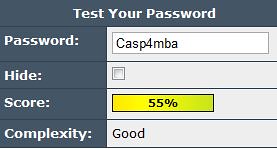
You can choose any combination but I would recommend on choosing the first letter of each word and doing simple substitutions such as 4 for “for”. Doing this substituion, we get
Casp4mba
Step 3: Add special characters
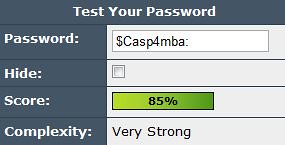
The above password is reasonably strong but let us make it better by adding special characters. Special characters are those you get when you press <shift> key plus one of the numbers on your keyboard.
To the password we created above, I will add special characters $ and :
$Casp4mba:
Step 4: Associate it with a website
Again, there are ways to add more complexity to make it a strong password, but for the sake of remembering a password, choose a pattern and stick with it. You can choose the major words and pick the first alphabet (BoA for Bank of America), choose a website/company’s stock name (amz for Amazon) or some other pattern. But choose one, and stick with it.
For example:
$Casp4mba:BoA for Bank of America
Fb$Caspmba: for Facebook
$Casp4mba:Amz for Amazon
Gm$Casp4mba: for Gmail
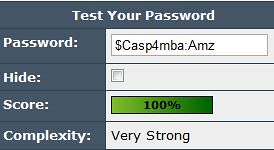
Step 5: Final Recommendation
I will recommend choosing three different passphrases. One for generic everyday accounts (e.g. some coupon site), another for more important accounts (e.g. your Gmail account) and finally another for very critical websites (e.g. your bank account).
Now, go try it yourself!
Thank you for sharing the password tips. I am definitely going to use something similar to start of with. Is there a reason why you suggested using three different sentences and not just use one and have a different one for each website I visit?
Deb, the key is to mix it up as much as possible and make it harder for the bad guys to get at your information. By having different passphrases, you introduce more variables. However, if you are following this technique for the first time, I would recommend you start off easy by using just a single passphrase and use more as you get comfortable.
Good info Ajit. I fact your site is full of information. I will recommend it.
Thanks!